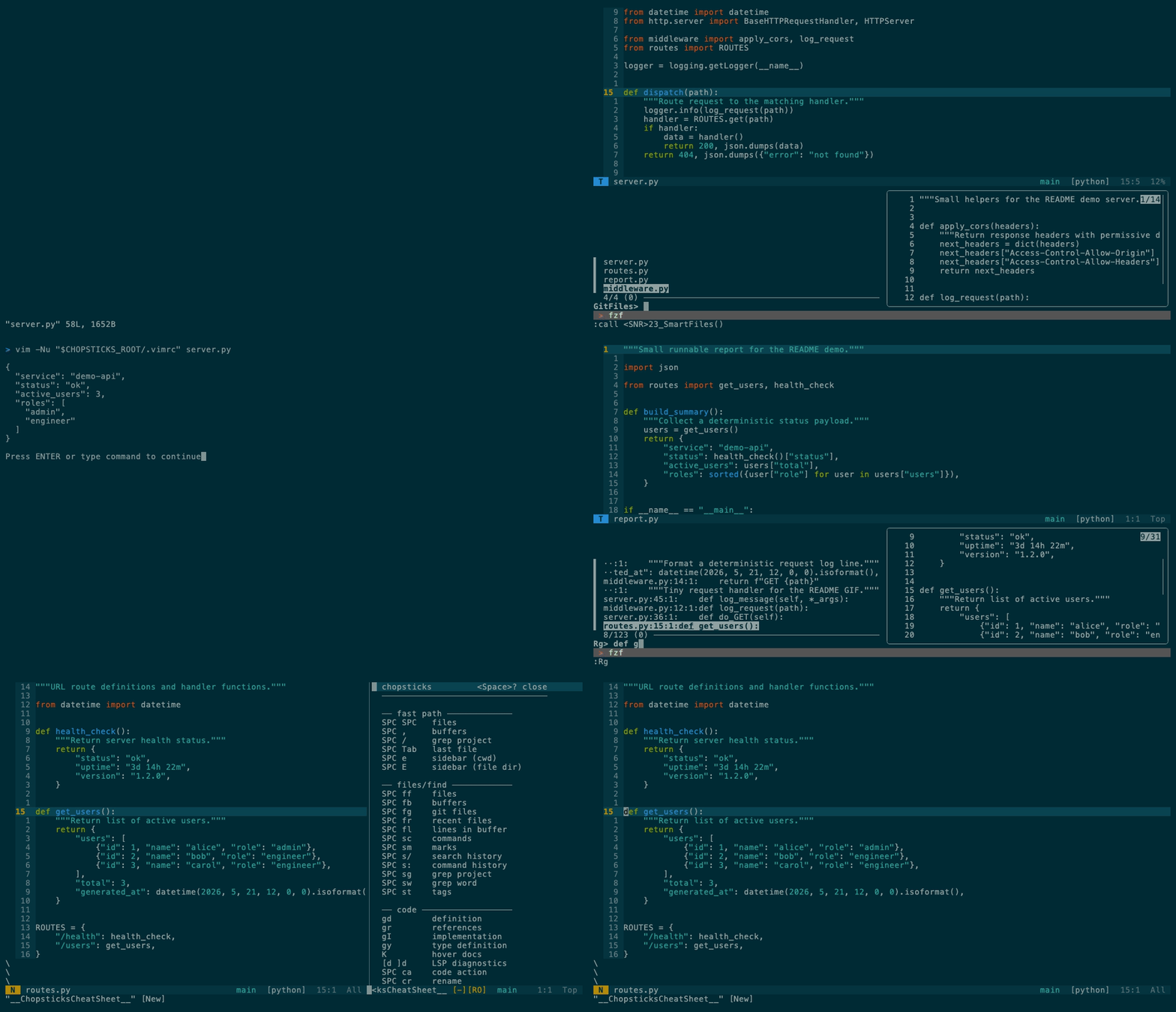
One project loop: jump on screen, find a file, run it, grep the codebase, then ask Vim what keys are active.
chopsticks
A project-work Vim setup: find, jump, run, grep, git, LSP, and self-documenting keys over SSH.





---
Stable install from `main`:
```bash
curl -fsSL https://raw.githubusercontent.com/m1ngsama/chopsticks/main/get.sh | bash
```
This branch is a v3 beta candidate, not a tagged stable release. Use
[BETA.md](BETA.md) instead of the stable install command when testing the Space
keymap before promotion.
---
## Why
Stock Vim is a great editor core, but it does not ship a complete project
workflow. You still have to assemble fuzzy finding, project grep, git, LSP,
diagnostics, formatters, runners, terminal behavior, and a keymap that will not
collapse over SSH.
That assembly work is the pain chopsticks removes:
- **Project motion is scattered.** Files, buffers, grep, tags, marks, git, and
diagnostics live behind unrelated commands unless you design a system.
- **Plugin defaults fight muscle memory.** chopsticks gives QWERTY users one
canonical Space layout and keeps native Vim/LSP habits where they matter:
`gd`, `gr`, `K`, `hjkl`, `cl`, `cc`.
- **Remote editing is fragile.** It is built to degrade on TTY, slow SSH, and
headless machines instead of assuming a GUI desktop.
- **Custom configs are hard to onboard.** `:ChopsticksHelp`, `SPC ?`,
`:ChopsticksTutor`, `:ChopsticksConfig`, and `:ChopsticksStatus` make the
active keymap, full help, local preferences, and missing tools visible inside
Vim.
You SSH into a server. You need to edit code. You want LSP, fuzzy find, git
integration, format-on-save — not a 20-minute setup.
chopsticks gives you a production-ready Vim config in one command. Pure VimScript — no Node.js for the core. Degrades gracefully on TTY. Works the same on your MacBook and your headless Arch box.
**23–25 plugins** (tmux-navigator loads only inside tmux; auto-pairs is opt-in), LSP, linting, and a hand-built statusline. No bloat, no decorations, just tools.
## What's in the box
| Feature | Description |
| ----------------- | -------------------------------------------------------------------------------------------------------------------------------------------------------------- |
| **LSP** | completion, go-to-def, hover, rename, code actions — pure VimScript ([vim-lsp](https://github.com/prabirshrestha/vim-lsp)) |
| **Lint + format** | [ALE](https://github.com/dense-analysis/ale) runs black, prettier, goimports, rustfmt on save |
| **Fuzzy find** | files, buffers, grep, tags, marks, commands — [FZF](https://github.com/junegunn/fzf.vim) |
| **Git** | status, diff, blame, commit, log, conflict markers — [fugitive](https://github.com/tpope/vim-fugitive) + [gitgutter](https://github.com/airblade/vim-gitgutter) |
| **Run file** | `SPC rr` — auto-detects Python, Go, Rust, JS, C, Shell, and more |
| **Markdown** | quiet writing defaults, browser preview (`,mp`), table of contents (`,mt`) |
| **Diagnostics** | `:ChopsticksStatus` — see what's installed, what's missing, how to fix it |
| **TTY-aware** | degrades gracefully on SSH, console, slow links — never breaks |
## Install
These commands install the stable `main` branch. For beta testing this branch,
use [BETA.md](BETA.md).
```bash
curl -fsSL https://raw.githubusercontent.com/m1ngsama/chopsticks/main/get.sh | bash
curl -fsSL https://raw.githubusercontent.com/m1ngsama/chopsticks/main/get.sh | bash -s -- --profile=minimal
curl -fsSL https://raw.githubusercontent.com/m1ngsama/chopsticks/main/get.sh | bash -s -- --dry-run --profile=full
```
Or manually:
```bash
git clone https://github.com/m1ngsama/chopsticks.git ~/.vim
cd ~/.vim && ./install.sh --profile=engineer
```
Supports macOS (brew), Debian/Ubuntu (apt), Arch (pacman), Fedora (dnf).
Set `CHOPSTICKS_DEST=/absolute/path` before running `get.sh` to install
somewhere other than `~/.vim`.
First launch installs plugins automatically (30-60s). Restart vim when done.
Use `./install.sh --dry-run --profile=full` to inspect the resolved profile and
config path without changing files. Use `./install.sh --configure-only
--profile=minimal` to switch profiles without reinstalling plugins or tools.
## Profiles
Default profile: `engineer`. Interactive installs ask for this profile before
plugins are installed; `--profile=minimal`, `--profile=engineer`, or
`--profile=full` selects it without prompting. `--yes` keeps the existing local
profile or uses `engineer`.
```vim
" Put this in ${XDG_CONFIG_HOME:-~/.config}/chopsticks.vim.
let g:chopsticks_profile = 'engineer' " default: LSP, ALE, syntax extras
" let g:chopsticks_profile = 'minimal' " core navigation/editing/git/markdown
" let g:chopsticks_profile = 'full' " engineer + heavier Markdown feedback
let g:chopsticks_keymap_style = 'space' " default: Space leader grouped layout
" let g:chopsticks_keymap_style = 'classic' " optional legacy comma layout
let g:chopsticks_enable_jk_escape = 1 " optional: insert-mode jk exits insert
let g:chopsticks_enable_ctrl_s_save = 1 " optional: Ctrl-S saves
let g:chopsticks_enable_sudo_save_bang = 1 " optional: :w!! sudo save
let g:chopsticks_enable_completion_keymaps = 1 " optional: Tab/Enter completion
let g:chopsticks_enable_auto_pairs = 1 " optional: automatic pair insertion
let g:chopsticks_enable_terminal_keymaps = 1 " optional: terminal Esc/Ctrl navigation
let g:chopsticks_enable_exrc = 1 " optional: source project-local .vimrc/.exrc from CWD
let g:chopsticks_enable_reindent_file = 1 " optional: full-file reindent map
```
`minimal` avoids LSP, ALE, completion plugins, extra language syntax plugins,
Startify, UndoTree, and browser Markdown preview. `full` keeps those and opts
into Markdown lint, format, spell, conceal, Marksman, and LSP virtual text.
Project updates leave `~/.config/chopsticks.vim` alone, so put local choices
there instead of editing the managed `.vimrc`. The `SPC ?` cheat sheet follows
the active profile and only shows keys for enabled features. Inside Vim, use
`:ChopsticksConfig` to edit that local file and `:ChopsticksReload` after
saving it.
## Keys
Default layout: `space`, leader `SPC`, localleader `,`.
This is the canonical layout for QWERTY keyboards with CapsLock mapped to
tap-Esc / hold-Ctrl. Escape and Ctrl stay at the system layer; Vim keeps the
native `` window model and standard LSP motions (`gd`, `gr`, `K`).
Git push/pull are intentionally not bound to default hotkeys. Normal-mode `s`
is a screen-local EasyMotion jump; use `cl` for native `s` substitute and `cc`
for native `S`.
For onboarding, use `:ChopsticksHelp` / `:help chopsticks` for full native Vim
help, `:ChopsticksTutor` for a guided practice page, `SPC ?` for the active
keymap, `:ChopsticksConfig` for local preferences, and `:ChopsticksStatus` for
tool/LSP health.
`QUICKSTART.md` is the 5-minute path; this README is the full reference.
During the beta, `:ChopsticksBeta` opens the in-editor test checklist,
`:ChopsticksBetaLog` opens editable local notes, and `:ChopsticksBetaSession`
appends a timestamped session block.
```
SPC SPC fuzzy find file gd go to definition
SPC / ripgrep project K hover docs
SPC e toggle file sidebar SPC rr run current file
SPC gs git status SPC cf format
SPC w save SPC qq quit
Esc exit insert mode SPC ? cheat sheet
:ChopsticksConfig local prefs :ChopsticksReload reload
```
Canonical Space keybindings
### Fast Path
`SPC SPC` files | `SPC ,` buffers | `SPC /` grep | `SPC Tab` alternate buffer | `SPC e` browser | `SPC E` browser (file dir)
### Files
`SPC ff` files | `SPC fb` buffers | `SPC fg` git files | `SPC fr` recent | `SPC fl` buffer lines | `SPC fL` all lines | `SPC fc` local config | `SPC fv` edit vimrc | `SPC fV` reload
### Search
`SPC sg` grep | `SPC sw` grep word | `SPC s/` search history | `SPC s:` command history | `SPC sm` marks | `SPC st` tags | `SPC sr` replace word
### Code
`gd` def | `gr` refs | `gI` impl | `gy` type | `K` docs | `[d` `]d` LSP diagnostics | `[e` `]e` ALE errors | `SPC ca` action | `SPC cr` rename | `SPC cf` format | `SPC co` outline | `SPC ci` LSP status | `SPC rr` run
### Edit
`s`+2ch jump | `SPC S` jump fallback | `cl` native `s` substitute | `cc` native `S` substitute | `gc` comment | `cs"'` surround | `Alt+j/k` move line | `SPC U` undo tree | `SPC y` clipboard | `SPC =` re-indent visual | `SPC cW` strip whitespace | `[` `]` blank lines
### Git
`SPC gs` status | `SPC gd` diff | `SPC gb` blame | `SPC gc` commit | `SPC gl` log graph | `SPC gC` FZF commits | `SPC gB` buffer commits | `]x` `[x` conflict
### Windows
`hjkl` navigate | `SPC z` maximize | `SPC bp` `SPC bn` buffers | `SPC bd` close buffer | `SPC bo` close other buffers | `SPC tt` `SPC th` terminal | `]q` `[q` quickfix | `SPC xq` `SPC xQ` open/close quickfix | `SPC xl` `SPC xL` open/close loclist
### Markdown
`,mp` preview in browser | `,mt` table of contents
### Toggle
`F2` paste | `F3` line numbers | `F4` relative numbers | `F6` invisible chars | `SPC us` spell check | `SPC uf` format on save
### Survival
`SPC w` save | `SPC W` save all | `SPC qq` quit | `SPC qx` save and quit | `SPC fc` local config | `SPC fV` reload | `SPC ?` cheat sheet | `:ChopsticksHelp` full help | `:ChopsticksTutor` practice | `:ChopsticksStatus` diagnostics
Legacy classic keybindings
### Classic Files
`,ff` find | `,b` buffers | `,rg` grep | `,rG` grep word | `,fh` recent | `,fl` lines | `,e` browser | `,E` browser (file dir) | `,,` last file
### Classic Code
`,dd` def | `,dt` type | `,di` impl | `,dr` refs | `,dk` docs | `,dp` `,dn` diagnostics | `[e` `]e` ALE errors | `,rn` rename | `,ca` action | `,o` outline | `,cr` run
### Classic Edit
`,S`+2ch jump | `gc` comment | `cs"'` surround | `Alt+j/k` move line | `,u` undo tree | `,y` clipboard | `,*` replace word | `,F` re-indent (v) | `,W` strip whitespace | `[` `]` blank lines
### Classic Git
`,gs` status | `,gd` diff | `,gb` blame | `,gc` commit | `,gL` log graph | `,gC` FZF commits | `,gB` buffer commits | `]x` `[x` conflict
### Classic Windows
`hjkl` navigate | `,z` maximize | `,h` `,l` buffers | `,bd` close buffer | `,=` `,-` resize | `,tv` `,th` terminal
### Classic Markdown
`,mp` preview in browser | `,mt` table of contents
### Classic Toggle
`F2` paste | `F3` line numbers | `F4` relative numbers | `F6` invisible chars | `,ss` spell check | `,af` format on save
### Utilities
`,cp` copy full path | `,cf` copy filename | `,ec` local config | `,ev` edit vimrc | `,sv` reload | `,wa` save all | `:ChopsticksStatus` diagnostics
## LSP
```vim
:LspInstallServer " auto-detects filetype
:LspStatus " check what's running
:ChopsticksStatus " see all tools + LSP + linters at a glance
```
pylsp, gopls, rust-analyzer, clangd, sqls — no Node.js. JS/TS servers need Node.
Markdown LSP (`marksman`) is opt-in so prose buffers stay quiet by default.
ALE and vim-lsp coexist cleanly (`ale_disable_lsp=1`). ALE handles linting + formatting. vim-lsp handles everything else.
## Markdown
Markdown opens in writing mode: wrapped text, no spell noise, no concealed
syntax, no sign column, no real-time markdownlint, and no Marksman diagnostics.
The explicit commands still work:
```vim
,mp " preview in browser
,mt " table of contents
```
Opt into heavier Markdown tooling from your own vimrc before loading
chopsticks:
```vim
let g:chopsticks_markdown_lint = 1
let g:chopsticks_markdown_format_on_save = 1
let g:chopsticks_markdown_lsp = 1
let g:chopsticks_markdown_spell = 1
let g:chopsticks_markdown_conceal = 1
let g:previm_enable_realtime = 1
```
For Markdown LSP, install or select `marksman` first.
## Architecture
```
~/.vim/
├── .vimrc thin loader
├── doc/
│ └── chopsticks.txt :help chopsticks
└── modules/
├── env.vim TTY detection, truecolor, skip built-in plugins
├── plugins.vim vim-plug + 23–25 plugins
├── core.vim settings, keymaps, performance
├── ui.vim solarized, statusline, startify
├── editing.vim easymotion, yank highlight, blank lines
├── navigation.vim fzf, netrw sidebar, windows, terminal
├── lsp.vim vim-lsp, asyncomplete
├── lint.vim ale, format-on-save
├── git.vim fugitive, gitgutter, conflict nav
├── languages.vim vim-go, markdown, filetype settings
├── buffers.vim buffer commands
├── utilities.vim config, reload, trim, clipboard helpers
├── files.vim auto mkdir, large-file protection
├── runner.vim run current file
├── quickfix.vim quickfix and location-list helpers
├── status.vim :ChopsticksStatus diagnostics
├── cheatsheet.vim SPC ? and :ChopsticksCheatSheet
├── tutor.vim :ChopsticksTutor guided practice
├── beta.vim :ChopsticksBeta test guide
├── help.vim :ChopsticksHelp native Vim help
└── tools.vim compatibility placeholder
```
Each module is self-contained. Comment out one line in `.vimrc` to disable it. Add your own with `call s:load('mine')`.
## Performance
| Metric | Value |
| ------------------------ | ------------------------------------------- |
| Lazy-loaded | 7 plugins (on command or filetype) |
| Built-in plugins skipped | 12 (gzip, tar, zip, vimball, logiPat, etc.) |
| Large file threshold | 10MB (auto-disables syntax + undo) |
| TTY large file | 500KB (syntax disabled) |
## Troubleshooting
| Problem | Fix |
| ------------------- | --------------------------------------------- |
| Plugins not loading | `:PlugInstall` then `:PlugUpdate` |
| LSP not starting | `:LspInstallServer` for current filetype |
| Colors wrong | `export COLORTERM=truecolor` in shell rc |
| Optional `Ctrl+s` freezes | `stty -ixon` in shell rc |
| Everything slow | Large file? Auto-disabled >10MB |
| What's installed? | `:ChopsticksStatus` shows tools, LSP, linters |
For deeper checks, start with `:ChopsticksStatus`, `SPC ?`,
`:ChopsticksTutor`, `:ChopsticksHelp`, `:ChopsticksConfig`, and
[QUICKSTART.md](QUICKSTART.md).
## Contributing
See [CONTRIBUTING.md](CONTRIBUTING.md). The two rules that matter: no Node.js in the Vim runtime, and don't regress startup time.
Regenerate the README demo after changing public keybindings:
```bash
vhs .github/demo.tape
```
The tape uses `.github/demo-project` and forces the current repository `.vimrc`,
so the GIF should show the same keymap the code actually ships.
## License
[MIT](LICENSE)