| .github | ||
| modules | ||
| scripts | ||
| .gitignore | ||
| .markdownlint.json | ||
| .vimrc | ||
| BETA.md | ||
| CHANGELOG.md | ||
| CONTRIBUTING.md | ||
| get.sh | ||
| install.sh | ||
| LICENSE | ||
| QUICKSTART.md | ||
| README.md | ||

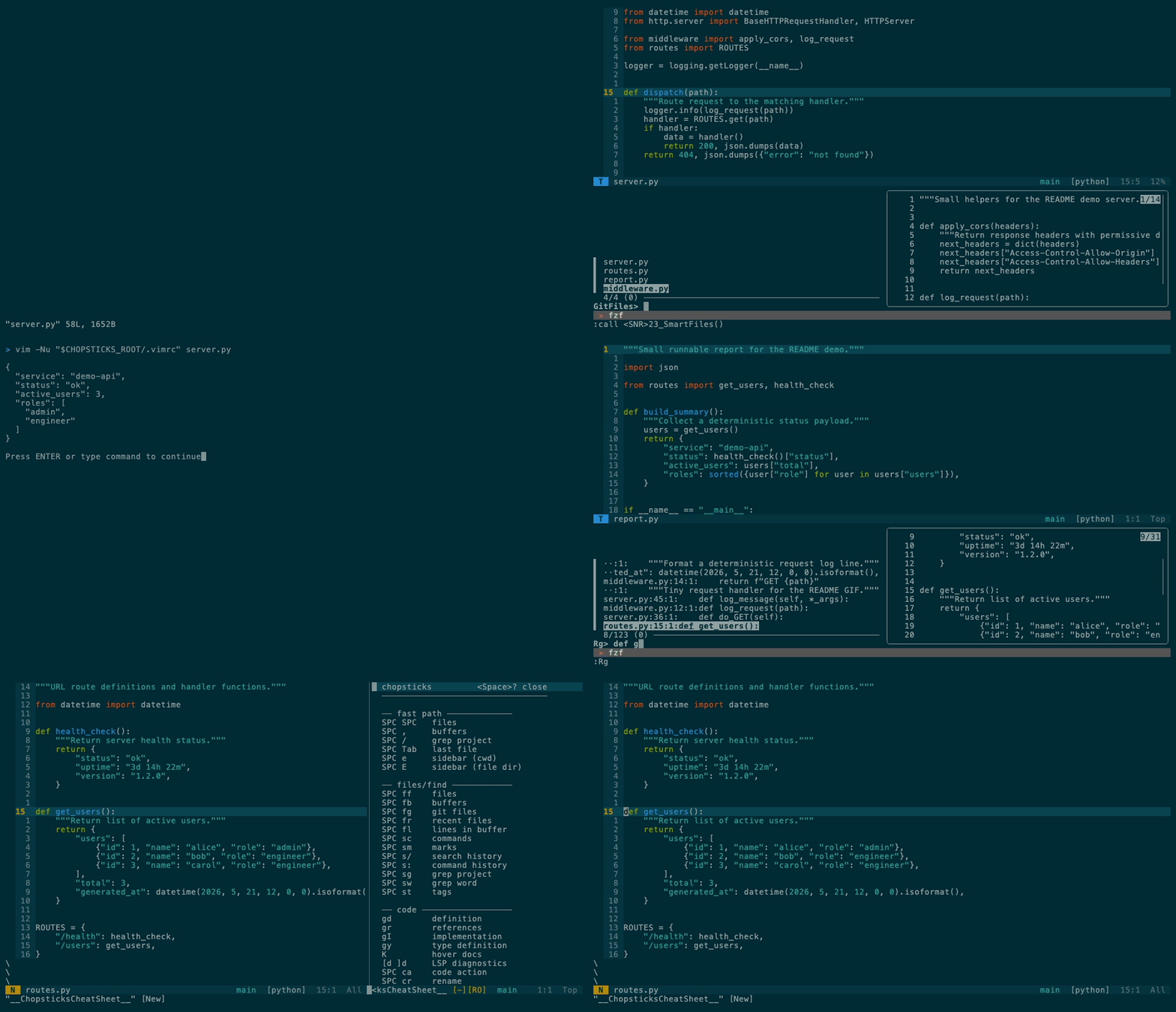
One project loop: jump on screen, find a file, run it, grep the codebase, then ask Vim what keys are active.
chopsticks
A project-work Vim setup: find, jump, run, grep, git, LSP, and self-documenting keys over SSH.





Stable install from main:
curl -fsSL https://raw.githubusercontent.com/m1ngsama/chopsticks/main/get.sh | bash
This branch is a v3 beta candidate, not a tagged stable release. Use BETA.md instead of the stable install command when testing the Space keymap before promotion.
Why
Stock Vim is a great editor core, but it does not ship a complete project workflow. You still have to assemble fuzzy finding, project grep, git, LSP, diagnostics, formatters, runners, terminal behavior, and a keymap that will not collapse over SSH.
That assembly work is the pain chopsticks removes:
- Project motion is scattered. Files, buffers, grep, tags, marks, git, and diagnostics live behind unrelated commands unless you design a system.
- Plugin defaults fight muscle memory. chopsticks gives QWERTY users one
canonical Space layout and keeps native Vim/LSP habits where they matter:
gd,gr,K,<C-w>hjkl,cl,cc. - Remote editing is fragile. It is built to degrade on TTY, slow SSH, and headless machines instead of assuming a GUI desktop.
- Custom configs are hard to onboard.
SPC ?,:ChopsticksTutor, and:ChopsticksStatusmake the active keymap and missing tools visible inside Vim.
You SSH into a server. You need to edit code. You want LSP, fuzzy find, git integration, format-on-save — not a 20-minute setup.
chopsticks gives you a production-ready Vim config in one command. Pure VimScript — no Node.js for the core. Degrades gracefully on TTY. Works the same on your MacBook and your headless Arch box.
23–25 plugins (tmux-navigator loads only inside tmux; auto-pairs is opt-in), LSP, linting, and a hand-built statusline. No bloat, no decorations, just tools.
What's in the box
| Feature | Description |
|---|---|
| LSP | completion, go-to-def, hover, rename, code actions — pure VimScript (vim-lsp) |
| Lint + format | ALE runs black, prettier, goimports, rustfmt on save |
| Fuzzy find | files, buffers, grep, tags, marks, commands — FZF |
| Git | status, diff, blame, commit, log, conflict markers — fugitive + gitgutter |
| Run file | SPC rr — auto-detects Python, Go, Rust, JS, C, Shell, and more |
| Markdown | quiet writing defaults, browser preview (,mp), table of contents (,mt) |
| Diagnostics | :ChopsticksStatus — see what's installed, what's missing, how to fix it |
| TTY-aware | degrades gracefully on SSH, console, slow links — never breaks |
Install
These commands install the stable main branch. For beta testing this branch,
use BETA.md.
curl -fsSL https://raw.githubusercontent.com/m1ngsama/chopsticks/main/get.sh | bash
curl -fsSL https://raw.githubusercontent.com/m1ngsama/chopsticks/main/get.sh | bash -s -- --profile=minimal
curl -fsSL https://raw.githubusercontent.com/m1ngsama/chopsticks/main/get.sh | bash -s -- --dry-run --profile=full
Or manually:
git clone https://github.com/m1ngsama/chopsticks.git ~/.vim
cd ~/.vim && ./install.sh --profile=engineer
Supports macOS (brew), Debian/Ubuntu (apt), Arch (pacman), Fedora (dnf).
Set CHOPSTICKS_DEST=/absolute/path before running get.sh to install
somewhere other than ~/.vim.
First launch installs plugins automatically (30-60s). Restart vim when done.
Use ./install.sh --dry-run --profile=full to inspect the resolved profile and
config path without changing files. Use ./install.sh --configure-only --profile=minimal to switch profiles without reinstalling plugins or tools.
Profiles
Default profile: engineer. Interactive installs ask for this profile before
plugins are installed; --profile=minimal, --profile=engineer, or
--profile=full selects it without prompting. --yes keeps the existing local
profile or uses engineer.
" Put this in ${XDG_CONFIG_HOME:-~/.config}/chopsticks.vim.
let g:chopsticks_profile = 'engineer'  " default: LSP, ALE, syntax extras
" let g:chopsticks_profile = 'minimal' " core navigation/editing/git/markdown
" let g:chopsticks_profile = 'full'    " engineer + heavier Markdown feedback
let g:chopsticks_keymap_style = 'space' " default: Space leader grouped layout
" let g:chopsticks_keymap_style = 'classic' " optional legacy comma layout
let g:chopsticks_enable_jk_escape = 1  " optional: insert-mode jk exits insert
let g:chopsticks_enable_ctrl_s_save = 1 " optional: Ctrl-S saves
let g:chopsticks_enable_sudo_save_bang = 1 " optional: :w!! sudo save
let g:chopsticks_enable_completion_keymaps = 1 " optional: Tab/Enter completion
let g:chopsticks_enable_auto_pairs = 1 " optional: automatic pair insertion
let g:chopsticks_enable_terminal_keymaps = 1 " optional: terminal Esc/Ctrl navigation
let g:chopsticks_enable_exrc = 1 " optional: source project-local .vimrc/.exrc from CWD
let g:chopsticks_enable_reindent_file = 1 " optional: full-file reindent map
minimal avoids LSP, ALE, completion plugins, extra language syntax plugins,
Startify, UndoTree, and browser Markdown preview. full keeps those and opts
into Markdown lint, format, spell, conceal, Marksman, and LSP virtual text.
Project updates leave ~/.config/chopsticks.vim alone, so put local choices
there instead of editing the managed .vimrc. The SPC ? cheat sheet follows
the active profile and only shows keys for enabled features.
Keys
Default layout: space, leader SPC, localleader ,.
This is the canonical layout for QWERTY keyboards with CapsLock mapped to
tap-Esc / hold-Ctrl. Escape and Ctrl stay at the system layer; Vim keeps the
native <C-w> window model and standard LSP motions (gd, gr, K).
Git push/pull are intentionally not bound to default hotkeys. Normal-mode s
is a screen-local EasyMotion jump; use cl for native s substitute and cc
for native S.
For onboarding, use :ChopsticksTutor for a guided practice page, SPC ? for
the active keymap, and :ChopsticksStatus for tool/LSP health.
QUICKSTART.md is the 5-minute path; this README is the full reference.
During the beta, :ChopsticksBeta opens the in-editor test checklist and
:ChopsticksBetaLog opens editable local notes.
SPC SPC   fuzzy find file          gd       go to definition
SPC /     ripgrep project          K        hover docs
SPC e     toggle file sidebar      SPC rr   run current file
SPC gs    git status               SPC cf   format
SPC w     save                     SPC qq   quit
Esc       exit insert mode         SPC ?    cheat sheet
Canonical Space keybindings
Fast Path
SPC SPC files | SPC , buffers | SPC / grep | SPC Tab alternate buffer | SPC e browser | SPC E browser (file dir)
Files
SPC ff files | SPC fb buffers | SPC fg git files | SPC fr recent | SPC fl buffer lines | SPC fL all lines | SPC fv edit vimrc | SPC fV reload vimrc
Search
SPC sg grep | SPC sw grep word | SPC s/ search history | SPC s: command history | SPC sm marks | SPC st tags | SPC sr replace word
Code
gd def | gr refs | gI impl | gy type | K docs | [d ]d LSP diagnostics | [e ]e ALE errors | SPC ca action | SPC cr rename | SPC cf format | SPC co outline | SPC ci LSP status | SPC rr run
Edit
s+2ch jump | SPC S jump fallback | cl native s substitute | cc native S substitute | gc comment | cs"' surround | Alt+j/k move line | SPC U undo tree | SPC y clipboard | SPC = re-indent visual | SPC cW strip whitespace | [<Space> ]<Space> blank lines
Git
SPC gs status | SPC gd diff | SPC gb blame | SPC gc commit | SPC gl log graph | SPC gC FZF commits | SPC gB buffer commits | ]x [x conflict
Windows
<C-w>hjkl navigate | SPC z maximize | SPC bp SPC bn buffers | SPC bd close buffer | SPC bo close other buffers | SPC tt SPC th terminal | ]q [q quickfix | SPC xq SPC xQ open/close quickfix | SPC xl SPC xL open/close loclist
Markdown
,mp preview in browser | ,mt table of contents
Toggle
F2 paste | F3 line numbers | F4 relative numbers | F6 invisible chars | SPC us spell check | SPC uf format on save
Survival
SPC w save | SPC W save all | SPC qq quit | SPC qx save and quit | SPC ? cheat sheet | :ChopsticksTutor practice | :ChopsticksStatus diagnostics
Legacy classic keybindings
Classic Files
,ff find | ,b buffers | ,rg grep | ,rG grep word | ,fh recent | ,fl lines | ,e browser | ,E browser (file dir) | ,, last file
Classic Code
,dd def | ,dt type | ,di impl | ,dr refs | ,dk docs | ,dp ,dn diagnostics | [e ]e ALE errors | ,rn rename | ,ca action | ,o outline | ,cr run
Classic Edit
,S+2ch jump | gc comment | cs"' surround | Alt+j/k move line | ,u undo tree | ,y clipboard | ,* replace word | ,F re-indent (v) | ,W strip whitespace | [<Space> ]<Space> blank lines
Classic Git
,gs status | ,gd diff | ,gb blame | ,gc commit | ,gL log graph | ,gC FZF commits | ,gB buffer commits | ]x [x conflict
Classic Windows
<C-w>hjkl navigate | ,z maximize | ,h ,l buffers | ,bd close buffer | ,= ,- resize | ,tv ,th terminal
Classic Markdown
,mp preview in browser | ,mt table of contents
Classic Toggle
F2 paste | F3 line numbers | F4 relative numbers | F6 invisible chars | ,ss spell check | ,af format on save
Utilities
,cp copy full path | ,cf copy filename | ,ev edit vimrc | ,sv reload vimrc | ,wa save all | :ChopsticksStatus diagnostics
LSP
:LspInstallServer    " auto-detects filetype
:LspStatus           " check what's running
:ChopsticksStatus    " see all tools + LSP + linters at a glance
pylsp, gopls, rust-analyzer, clangd, sqls — no Node.js. JS/TS servers need Node.
Markdown LSP (marksman) is opt-in so prose buffers stay quiet by default.
ALE and vim-lsp coexist cleanly (ale_disable_lsp=1). ALE handles linting + formatting. vim-lsp handles everything else.
Markdown
Markdown opens in writing mode: wrapped text, no spell noise, no concealed syntax, no sign column, no real-time markdownlint, and no Marksman diagnostics. The explicit commands still work:
,mp    " preview in browser
,mt    " table of contents
Opt into heavier Markdown tooling from your own vimrc before loading chopsticks:
let g:chopsticks_markdown_lint = 1
let g:chopsticks_markdown_format_on_save = 1
let g:chopsticks_markdown_lsp = 1
let g:chopsticks_markdown_spell = 1
let g:chopsticks_markdown_conceal = 1
let g:previm_enable_realtime = 1
For Markdown LSP, install or select marksman first.
Architecture
~/.vim/
├── .vimrc              thin loader
├── modules/
│   ├── env.vim         TTY detection, truecolor, skip built-in plugins
│   ├── plugins.vim     vim-plug + 23–25 plugins
│   ├── core.vim        settings, keymaps, performance
│   ├── ui.vim          solarized, statusline, startify
│   ├── editing.vim     easymotion, yank highlight, blank lines
│   ├── navigation.vim  fzf, netrw sidebar, windows, terminal
│   ├── lsp.vim         vim-lsp, asyncomplete
│   ├── lint.vim        ale, format-on-save
│   ├── git.vim         fugitive, gitgutter, conflict nav
│   ├── languages.vim   vim-go, markdown, filetype settings
│   ├── buffers.vim     buffer commands
│   ├── utilities.vim   reindent, trim, clipboard, vimrc helpers
│   ├── files.vim       auto mkdir, large-file protection
│   ├── runner.vim      run current file
│   ├── quickfix.vim    quickfix and location-list helpers
│   ├── status.vim      :ChopsticksStatus diagnostics
│   ├── cheatsheet.vim  SPC ? and :ChopsticksCheatSheet
│   ├── tutor.vim       :ChopsticksTutor guided practice
│   ├── beta.vim        :ChopsticksBeta test guide
│   └── tools.vim       compatibility placeholder
Each module is self-contained. Comment out one line in .vimrc to disable it. Add your own with call s:load('mine').
Performance
| Metric | Value |
|---|---|
| Lazy-loaded | 7 plugins (on command or filetype) |
| Built-in plugins skipped | 12 (gzip, tar, zip, vimball, logiPat, etc.) |
| Large file threshold | 10MB (auto-disables syntax + undo) |
| TTY large file | 500KB (syntax disabled) |
Troubleshooting
| Problem | Fix |
|---|---|
| Plugins not loading | :PlugInstall then :PlugUpdate |
| LSP not starting | :LspInstallServer for current filetype |
| Colors wrong | export COLORTERM=truecolor in shell rc |
Optional Ctrl+s freezes |
stty -ixon in shell rc |
| Everything slow | Large file? Auto-disabled >10MB |
| What's installed? | :ChopsticksStatus shows tools, LSP, linters |
For deeper checks, start with :ChopsticksStatus, SPC ?,
:ChopsticksTutor, and QUICKSTART.md.
Contributing
See CONTRIBUTING.md. The two rules that matter: no Node.js in the Vim runtime, and don't regress startup time.
Regenerate the README demo after changing public keybindings:
vhs .github/demo.tape
The tape uses .github/demo-project and forces the current repository .vimrc,
so the GIF should show the same keymap the code actually ships.